

Pins
A pin represents a real place.
Every object in Pin Drop begins with a location. Whether you are tracking a customer, a site, a prospect, a venue or a trail, the pin is the starting point. It anchors information to geography.
Everything else in the product attaches to pins:
- Tags classify them.
- Tasks organise work around them.
- Visits record time spent there.
- Routes connect them.
- Territories group them.
- Pipelines structure their lifecycle.
- Notes and media document what happened.
If there is no pin, there is no structure.
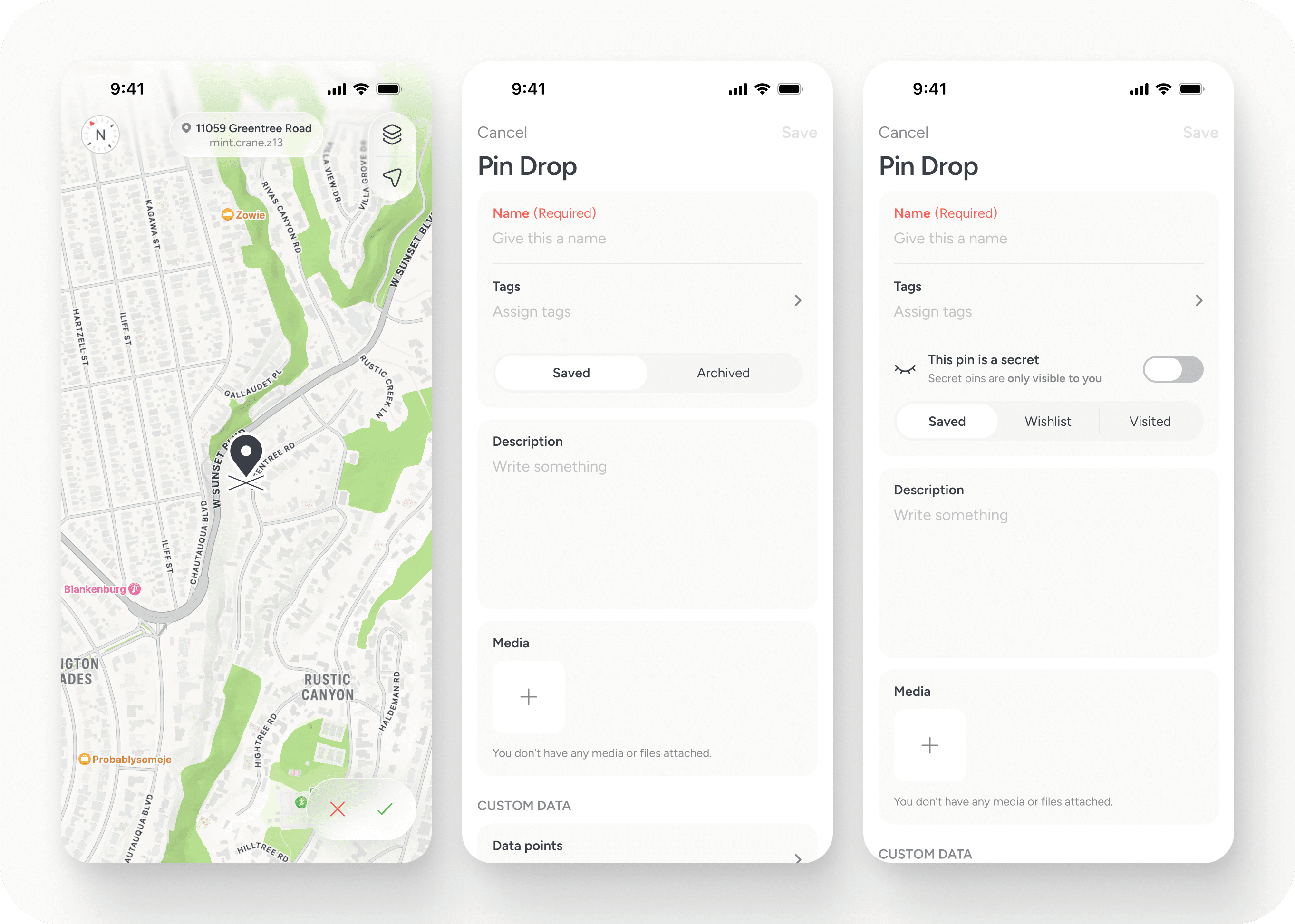
Dropping a pin
Pins can be created in multiple ways, depending on how you are working.
The simplest way is to search for a place and save it. If the location already exists, it can be added instantly to your map with accurate address details.
If you are exploring freely, you can long-press anywhere on the map to begin a pin drop. This allows you to define a location manually, even if it does not yet exist in a searchable database. You can also create a pin through the create (+) menu, which provides a structured way to add a new location.
Pins can also be saved from the browser extension, imported in bulk from data files, or created from photos (see below).
Regardless of how a pin is created, it becomes the same object in the system. The method of capture does not change its structure or capability.
The goal is flexibility. Whether you are researching at a desk or standing on a roadside, you should be able to record the place immediately.
Creating pins from photos
Pins can be created directly from photos stored on your device.
When a photo contains location metadata (EXIF data), Pin Drop can read the geographic coordinates and place the pin automatically at the correct position on the map.
For this to work, location services must be enabled on your mobile device or camera at the time the photo was taken. If location data is not embedded in the image, the system cannot determine where it was captured.
This feature is particularly useful when mapping activity retrospectively. For example, you might:
- Map a recent trip after returning home
- Document a site visit using photographs taken on location
- Record prospecting activity without manually dropping pins in the moment
By using embedded location data, the map can be reconstructed accurately from your media.
As with all pins, once created, photo-based pins behave like any other location. You can tag them, attach tasks, record visits and integrate them into routes or territories.
How to enable EXIF/geotagging on your device:
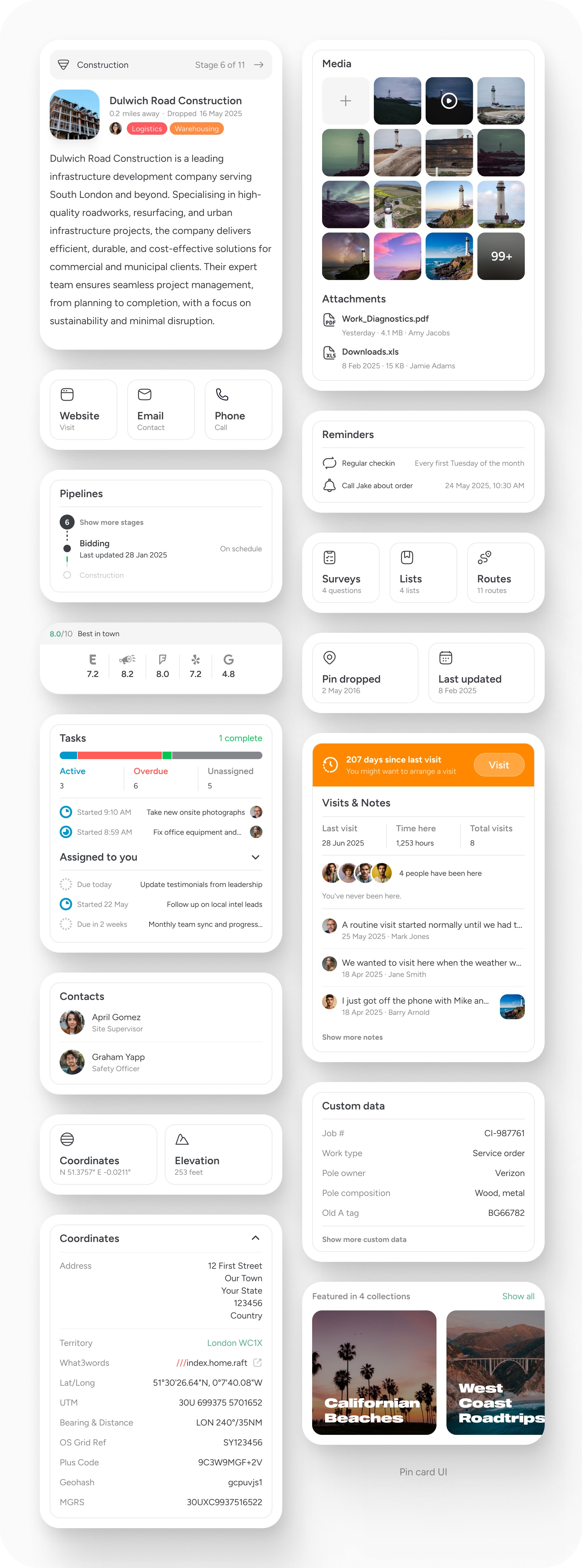
What a pin contains
At its simplest, a pin stores:
- A name
- A location
- Tags
- A description
- Contact information
- Media
Location can be moved at any time. If a pin was dropped inaccurately or needs adjustment, you can reposition it directly on the map.
Contact details such as website, phone and address can be entered manually. In some cases, they may be detected automatically when created via search or the browser extension.
There is no limit to how many photos or videos can be attached. Media helps build a visual record of the place. On paid plans, file attachments can also be added.
Over time, the pin becomes a structured record of activity tied to that location.
How pins connect to everything else
Pins do not exist in isolation.
- When you add a task, it must be tied to a pin.
- When you record a visit, it is recorded against a pin.
- When you build a route, it connects pins.
- When you define a territory, it groups pins within its boundary.
- When you use a pipeline, it tracks pins through stages.
- When you add a reminder, it attaches to a pin.
This design ensures that work remains geographic. Actions are never floating independently. They are always anchored to place.
Because of this, reporting and analysis remain structured. Activity can be traced back to where it happened.
Free and Pro pins
On Free plans, pins provide core mapping functionality.
You can add:
- Name
- Tags
- Description
- Address
- Website
- Phone
- Photos and videos
Pins can be shared publicly. Free users can embed their profile map or a tag view externally. Pins can be deleted at any time.
On paid plans, pins become operational objects.
In addition to everything above, you can:
- Attach files
- Add comments
- Link contacts
- Attach pipelines
- Add reminders
- Include pins in routes
- Create tasks
- Record visits and notes
- Archive instead of delete
- View edit history
Edit history is available on paid plans and shows how a pin has changed over time. The depth of history depends on plan level.
On Team plans, team members can edit and delete content on pins unless permissions are restricted. Pins cannot currently be private within a workspace. They are shared objects inside that environment.
Notifications and reminders
You can enable “Notify me when nearby” on any plan. This triggers a push notification when you are close to the location.
Reminders can also be added on paid plans to prompt follow-up actions tied directly to the pin.
Both features reinforce the same idea. Location should trigger action when relevant.
Lifecycle: edit, archive, delete
Pins are flexible.
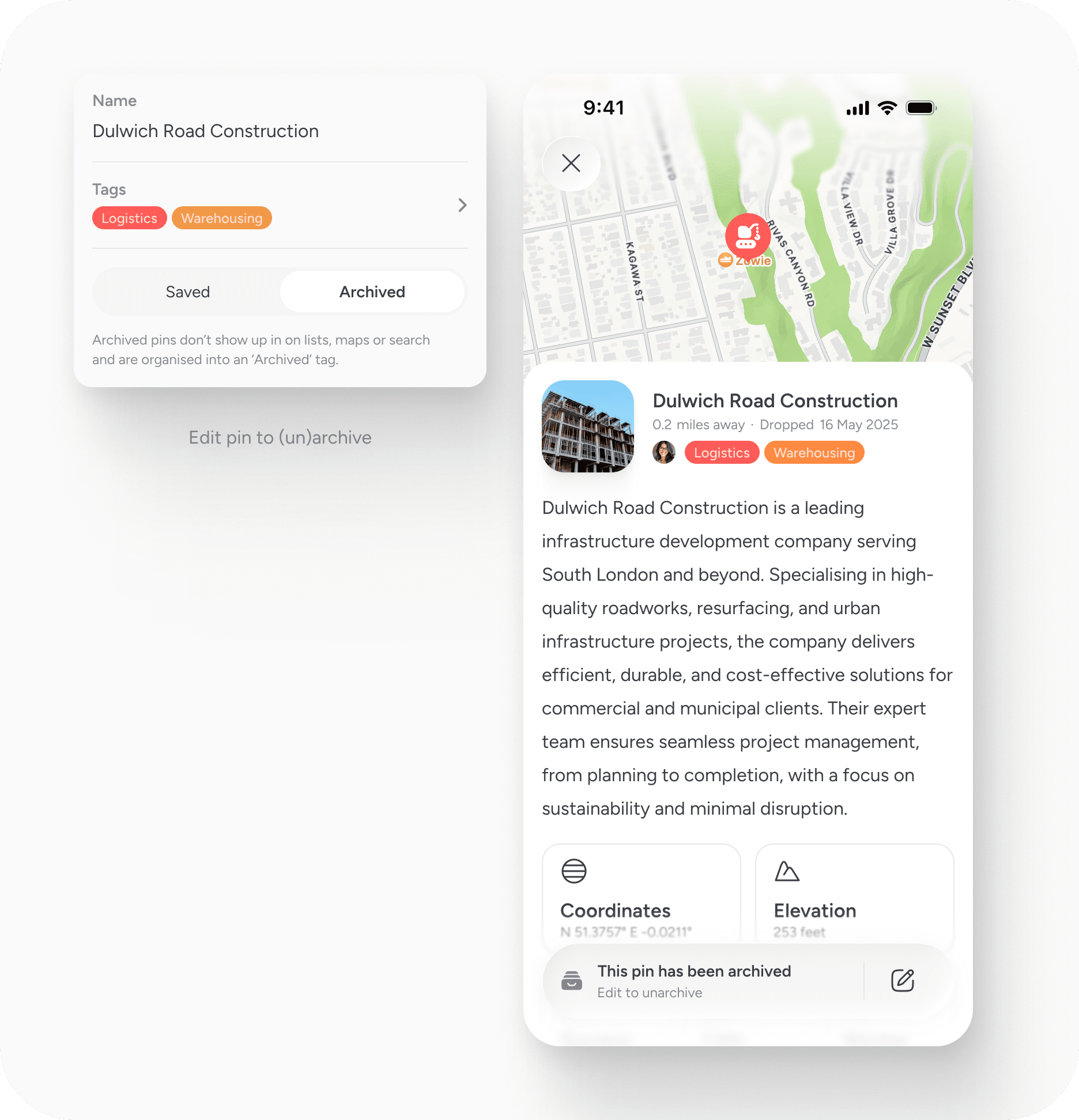
They can be edited, renamed and moved at any time. On paid plans, they can be archived when no longer active. Archiving removes them from active views without deleting their history.
Free plans allow deletion but not archiving.
Pins cannot currently be duplicated. Bulk merging functionality is being introduced via the web app.
Deleting a pin removes its associated data. Archiving preserves it.
Ownership and accountability
Within a workspace, pins belong to the workspace. If a member leaves, the pins and associated activity remain. On Free accounts, users can delete their account and all associated data at any time.
Pins are not temporary markers. They are records.
A simple principle
Pins are the foundation of the system. Every action, note, task and visit is tied to a place. This ensures that work remains grounded in geography rather than drifting into disconnected lists.
When you understand pins, you understand the product. Everything begins with place.


