

Searching in Pin Drop
Search is one of the fastest ways to move through the information stored on your map. As your collection of places grows, it becomes less practical to manually browse the map to locate a specific pin or piece of information. Search allows you to quickly locate places, notes, territories and routes, or discover new locations that have not yet been saved. Whether you are trying to rediscover somewhere you visited months ago or looking for a completely new place, search helps you move through the real world and the information attached to it with far less effort.
Search works across both the places you have already saved and real-world locations that exist outside your map. When you begin typing, Pin Drop looks through the titles of pins, tags, territories and routes, as well as the text stored inside descriptions and notes. Because search also looks inside the information attached to places, even small details written in a note can help you rediscover a location later.
Results are ordered by relevance, meaning the most likely match will appear first. This allows search to remain useful even when your map contains hundreds or thousands of places. Instead of needing to remember the exact title of a location, you can often find it again using fragments of information, a neighbourhood name or a detail you included in the description.
Searching your saved places
When you search in Pin Drop, the app first looks through the places and information you have already stored. This includes pin titles, tags, territories, routes and the descriptive text attached to locations. Because search looks across multiple layers of information, it becomes easier to rediscover places using the context surrounding them rather than needing to remember the exact name you used when saving them.
For example, a location might appear when searching for a tag attached to it, a note written inside the pin or the address associated with that place. Over time this allows your map to behave more like a searchable record of the real world, where places can be rediscovered through the information attached to them.
Search always operates within the data you have access to. For free and Solo users this means the results will come from the places, tags and territories you have created yourself. Within a team workspace, search can also include shared content that you have permission to see, ensuring that results remain relevant to your work and the areas you are responsible for.
Searching for new locations
Search is also used to discover locations that are not yet part of your map. You can search using:
- place names
- towns or cities
- full street addresses
- latitude and longitude coordinates
- what3words locations
When a location appears in the results you can centre the map on that place and explore the surrounding area.
This allows the app to act not only as a record of the places you already know, but also as a tool for discovering and capturing new ones. External location data may come from a variety of third-party providers, allowing you to find real-world places even before they become part of your own map.
Creating pins from search results
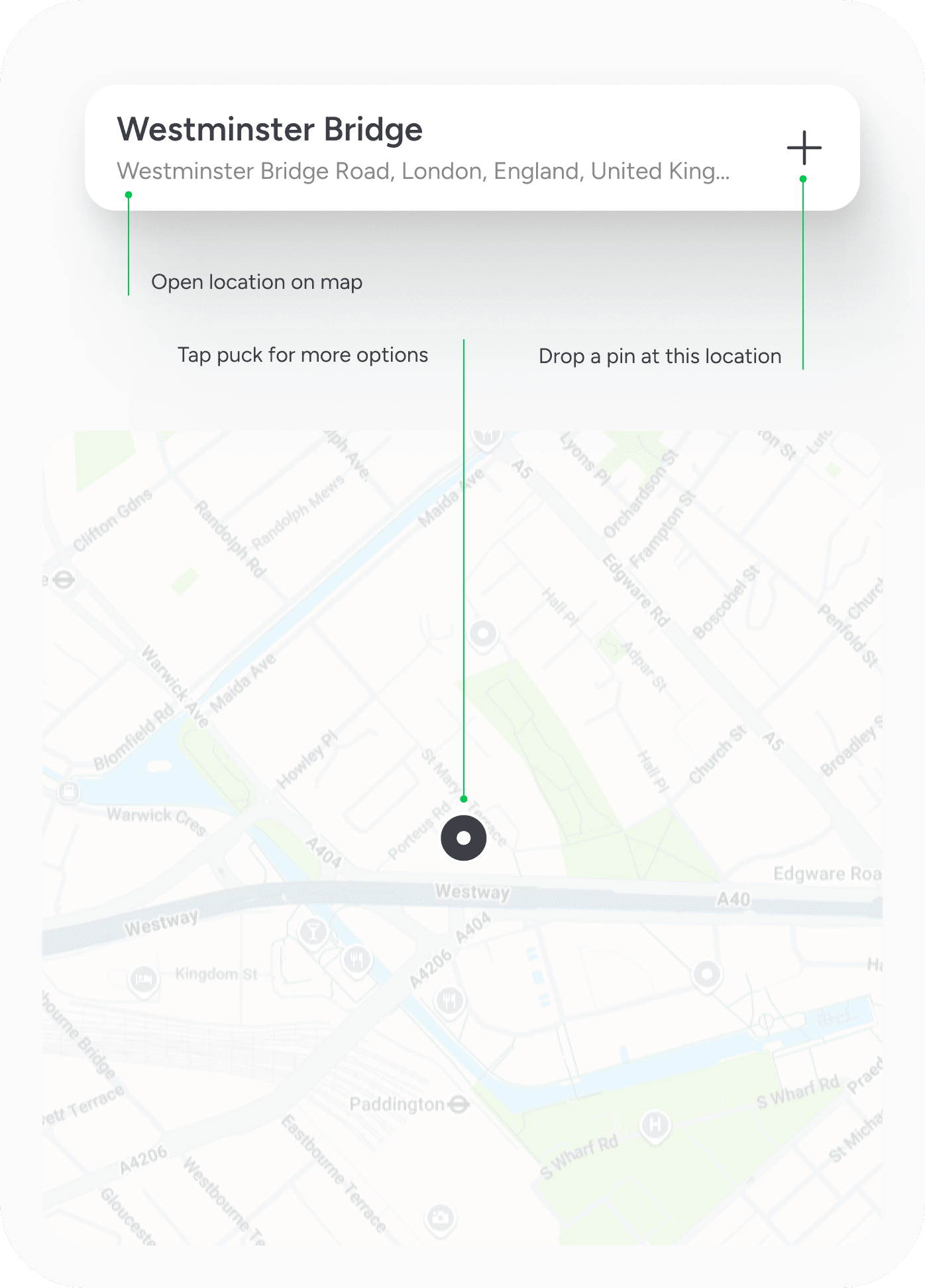
When a search result represents a place that is not yet saved, you can easily turn it into a new pin. A plus icon appears beside address results, allowing you to create a pin directly from the search interface. This creates a new record for that location which can then be organised, tagged and expanded with notes or additional data.
If you prefer to explore the location before saving it, tapping the location name will centre the map on that place. From there you can choose to drop a pin manually, get directions or teleport your map view to explore the surrounding area. This makes search a quick way to convert real-world places into structured information that lives inside your map.
Navigating the map with search
Search is not only used to locate existing information. It is also a fast way to move around the map itself. Instead of manually panning across large distances, search can instantly reposition the map to a specific place, city or coordinate.
Tapping a location result moves the map to that area, allowing you to explore nearby pins, create new locations or begin planning routes. Many users rely on search as their primary way of navigating the map, particularly when working across large regions or switching between different territories.
Searching within tags and territories
Search can also operate within specific collections of places. When viewing a tag or territory, search results will be limited to the locations contained within that group. This allows you to narrow the scope of your search and quickly find places within a defined set of locations.
For example, searching within a territory will only return results that belong to that area. Similarly, searching within a tag will return only the pins associated with that tag. This becomes particularly useful as maps grow larger and collections of places become more specialised.
On the web version of Pin Drop, search can also be used within specific data types such as pins, tags, routes and territories. This provides additional structure when working with larger datasets and allows you to focus your search on a particular type of information.
Understanding search relevance
Search results are ordered by relevance rather than alphabetical order or physical distance. The app evaluates how closely the search term matches the information stored across your map, including titles, notes, tags and addresses. The most likely match appears first so that useful results remain easy to find even when many similar places exist.
Because search evaluates the broader information attached to a location, it often becomes possible to rediscover places using partial information. A location might appear when searching for a word written in a note, a nearby neighbourhood or a tag attached to the pin.
Making search more powerful over time
Search becomes more useful as more information is added to your map. Every title, note, tag and piece of structured data attached to a place contributes to how easily it can be rediscovered later. Over time your map becomes a searchable record of places, activity and knowledge tied to location.
Adding clear titles, useful notes and meaningful tags makes it easier to rediscover locations months or even years later. Many users find that information they recorded casually at the time becomes valuable later when searching for places they only partially remember.
Using search effectively
Search works best when places are organised consistently. Short descriptive titles help locations stand out in results, while tags and territories allow groups of places to be searched more easily within defined areas. Notes and descriptions also become valuable because search can match against the text written inside a pin.
As your map grows, these small pieces of information allow search to surface places through context rather than exact matches. A location might appear because of a word written in a note, a tag attached to it or the territory it belongs to. Over time this turns the map into a structured record of places that can be explored and rediscovered quickly.
Common questions
Search in Pin Drop works across both your saved places and external locations, allowing you to find addresses, place names and coordinates even if they have not yet been added to your map. If you want to save a new location from the results, you can create a pin directly from search using the plus icon beside the address result.
Search also looks inside notes and descriptions attached to pins, which means information written inside a location can help surface it later. When searching within a tag or territory, the results will be limited to the places contained within that group, helping you narrow your search when working with larger collections of locations.
Over time, search becomes one of the most powerful ways to navigate and rediscover the information stored on your map. As more places are added and enriched with notes, tags and territories, the search function allows you to move through that information quickly and confidently, turning your map into a structured record of the places that matter.


